

GPUs once specialized tools for graphics rendering, have become the critical foundation of global AI development. The competitive advantage no longer belongs to organizations that simply acquire GPUs, it belongs to those who strategically plan capacity, intelligently source hardware, and relentlessly optimize every aspect of their infrastructure stack.
The global GPU market stands at an inflection point. Data center GPU spending has nearly doubled from $60 billion in 2024 to an estimated $119.97 billion in 2025, with projections reaching $228.04 billion by 2030. The broader GPU market trajectory is equally remarkable, expanding from $101.54 billion in 2025 toward $410 billion by 2030.
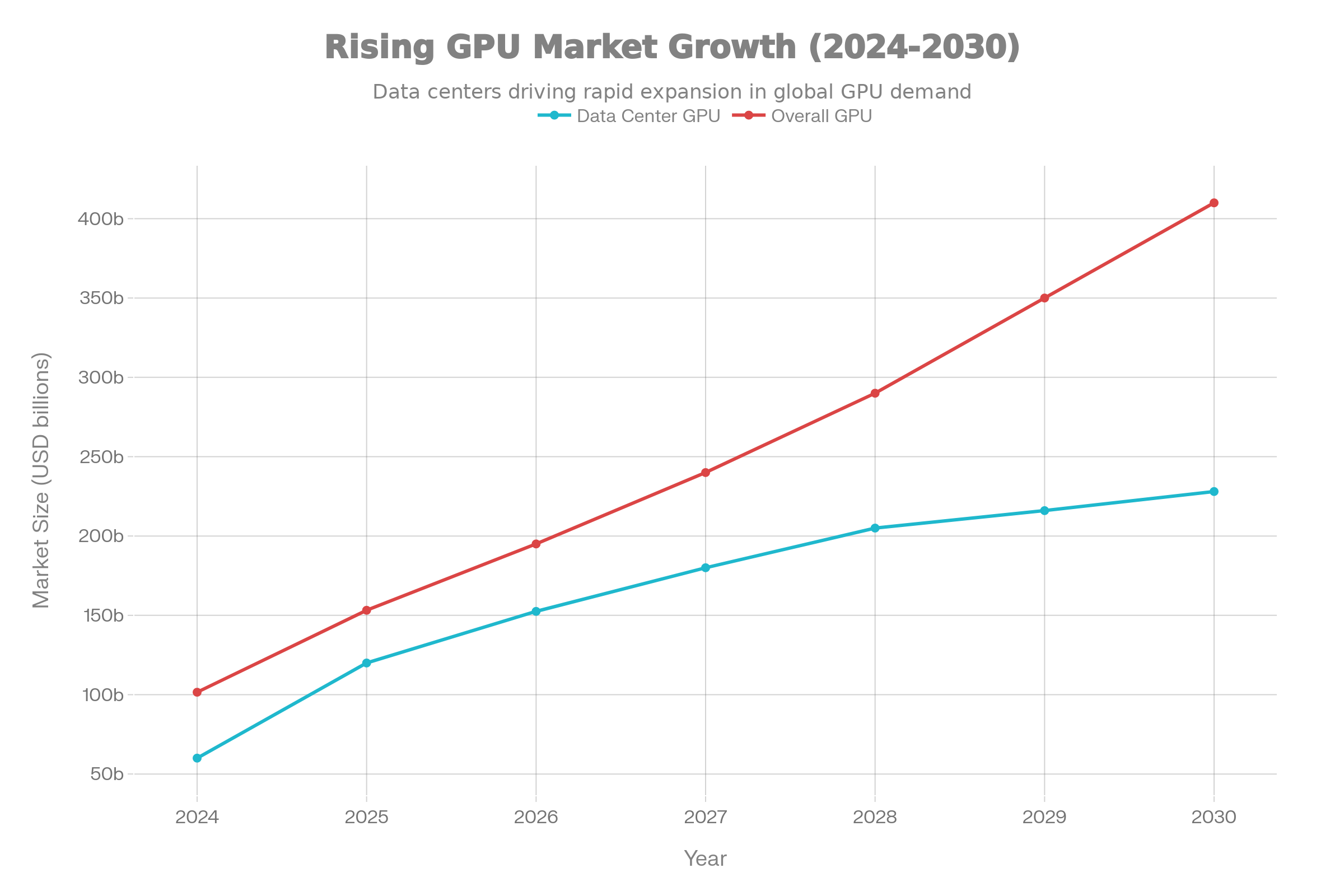
This explosive growth reflects the convergence of artificial intelligence adoption, advanced deep learning workloads, and computational demands that continue to outpace supply. NVIDIA maintains approximately 90% of the GPU market share, with over 4 million developers and 40,000 companies now leveraging GPU-accelerated computing for machine learning and AI applications. The result is a market characterized by supply constraints, shortened hardware cycles, and organizations competing fiercely for access to the latest architectures.
The modern GPU ecosystem now encompasses a diverse range of specialized processors designed for distinct workload profiles. H-series GPUs deliver the memory capacity and bandwidth required for intensive training operations. B-series processors bring performance improvements through advanced chiplet designs. GB-series architectures enable massive-scale distributed training. Demand keeps rising faster than supply. Hardware refresh cycles are shorter. Teams compete for access to the newest chips. The real bottleneck is no longer “Do we have GPUs?” but “Can our infrastructure support them at full performance?” This is where Spheron AI becomes a critical part of any modern AI strategy.
Spheron AI delivers bare-metal performance, full-VM control, and access to GPUs across many providers in one place. It removes supply shortage pain and gives engineering teams the flexibility to scale without overpaying for hyperscalers or getting locked into a single vendor. Below is a complete guide to GPU capacity planning, sourcing, and optimization.
Phase 1: Understanding Your Workload Architecture
Strategic GPU capacity planning begins with comprehensive workload characterization. Organizations must move beyond simplistic assumptions about compute requirements and develop precise, data-driven understanding of what their AI systems actually demand.
Workload Types and What They Demand
Training workloads push compute, memory, and networking harder than anything else. Fine-tuning requires significant memory and bandwidth but at a lower intensity. Inference workloads trade compute power for low latency and high throughput.
Spheron AI supports this full spectrum because you can choose lightweight GPUs for inference and move to H100/H200/B200 for training as soon as you need them.
This matters because the hardware you select changes your cost model. Running a 7B model for training on the wrong GPU architecture wastes money. Running inference on a high-end GPU wastes money too. Spheron’s aggregated network makes switching hardware fast so you don’t lock yourself into bad configurations.
Memory dictates what you can run. Parameter count alone doesn’t give the full picture. You must also account for optimizer states, activation memory, and precision. A 7B model in FP16 needs about 28GB of VRAM. Spheron AI offers 24GB, 48GB, 80GB, 141GB, and even larger memory footprints through H100, H200, and B200 nodes so teams never hit memory ceilings mid-project.
For models above 70B parameters, only the newest architectures like H200 or B200 make sense. Spheron AI gives access to these GPUs without hyperscaler overhead.
Scaling Behavior and Multi-GPU Efficiency
Adding GPUs does not guarantee linear speed. Network bandwidth often becomes the limiter.
Spheron AI supports both PCIe and high-bandwidth SXM/InfiniBand systems, so users can match GPU type to expected scaling efficiency. If the workload drops below 60% per-GPU throughput at 8 GPUs, the problem is usually networking, not compute. Spheron’s multi-provider architecture helps teams quickly move workloads to regions and clusters that fit scaling requirements, instead of being stuck with one provider’s limitations.
Phase 2: Matching Infrastructure to Workload Trajectory
Once workload requirements are precisely characterized, organizations face a fundamental architectural decision: how to acquire GPU capacity across the intended operational timeline.
Cloud GPU Services: Flexibility Without Lock-In
Cloud GPU platforms give fast access and predictable operations. Specialized GPU clouds already undercut hyperscalers by 60–80%. Spheron AI goes further by aggregating supply from many providers and exposing all of it through one dashboard.
This lets teams access the exact GPU they need for training or inference without juggling multiple vendor accounts or contracts.
Example pricing gap:
-
H100 on AWS → about $3.90/hr
-
H100 on specialized providers → around $1.49/hr
-
H100 on Spheron AI → low aggregated pricing without hidden overhead
The same applies to H200 and B200. Spheron pricing stays predictable because the platform removes warm-up billing, idle billing, and storage taxes that inflate cloud bills.
On-Premises Infrastructure: Control at a Cost
Owning GPUs gives full control but requires high capital investment, steady utilization, and dedicated staff. For organizations that cannot maintain 33%+ sustained utilization, cloud or aggregated platforms like Spheron AI become far more economical.
A typical four-GPU on-prem cluster costs about $246,624 over three years. Equivalent cloud deployment costs about $122,478. Spheron AI can drop the compute portion of that cloud bill by 60–75%.
This makes Spheron useful as an intermediate step for companies not ready to buy hardware but needing more control than hyperscalers allow.
Hybrid and Specialty GPU Models
Most teams today mix approaches.
Spheron AI covers all three. Users can run consistent jobs on PCIe systems, burst into SXM/InfiniBand clusters, or experiment with new architectures without waiting months for hyperscaler availability. Switching across these environments takes minutes because Spheron exposes them through one control plane.
Phase 3: Converting GPU Assets into Measurable Value
Securing GPU capacity represents only the initial investment. Optimization across technical and operational dimensions determines whether that investment generates appropriate returns.
The Utilization Crisis: Why GPUs Operate Far Below Capacity
Traditional unoptimized AI training pipelines consistently achieve disappointingly low GPU utilization rates. Benchmark measurements from NVIDIA’s own optimized implementations reveal the severity: ResNet50 training achieves only 16.4% GPU utilization on single A100s and 15.9% on 8-GPU configurations. BERT Large training reaches 36.8% utilization on 8x A100 clusters and 38.9% on 8x V100 configurations.
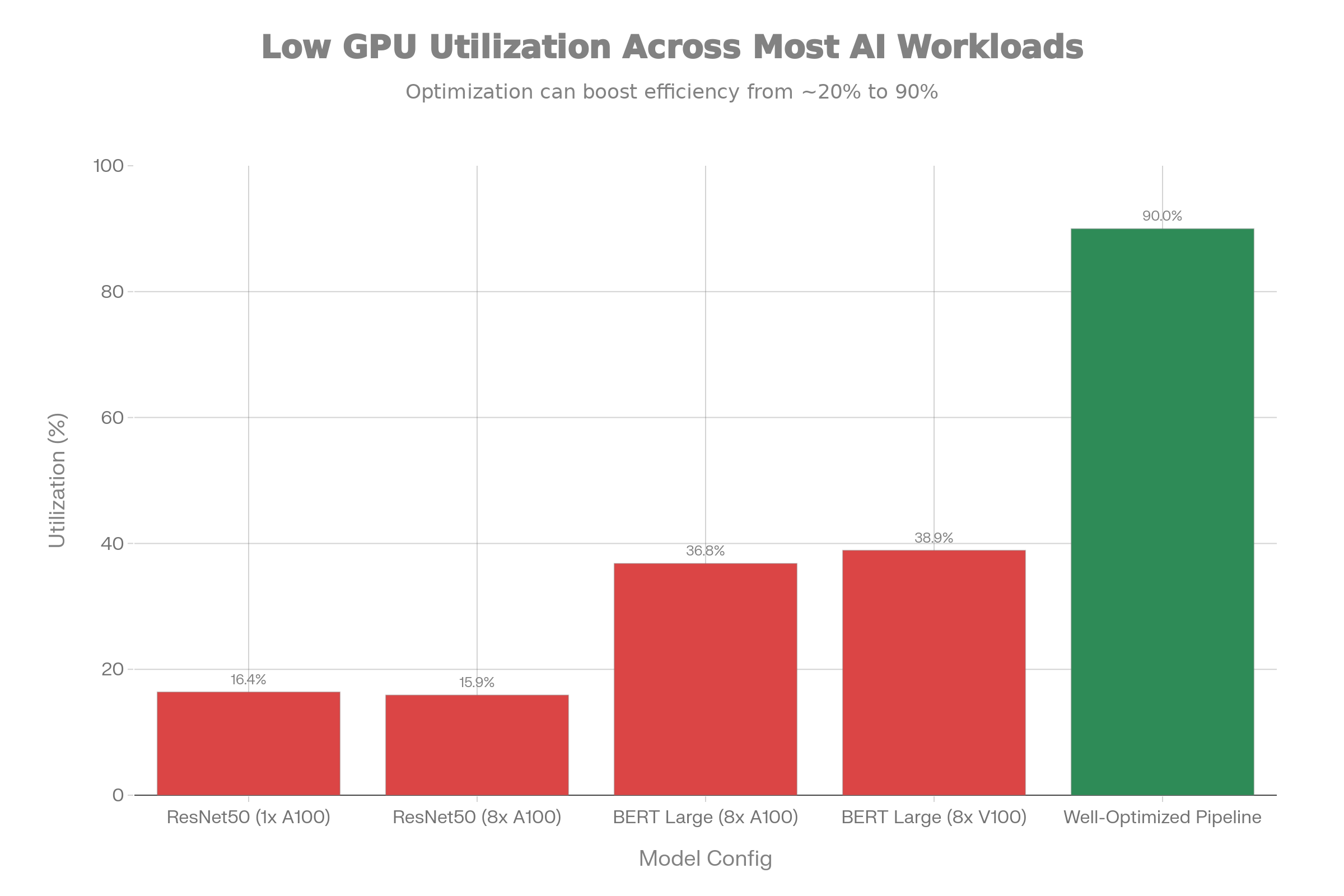
These numbers represent NVIDIA’s optimized implementations using publicly available models and standard frameworks. Production implementations with custom architectures and novel training procedures typically exhibit even worse utilization. The consequence is stark: a $30,000+ GPU operating at 16% utilization wastes approximately $25,000 of its capacity annually, while consuming full electricity and cooling costs.
Organizations that implement systematic optimization often achieve 85-95% GPU utilization during active training phases. This 5-6x improvement in utilization effectively multiplies infrastructure capacity without hardware investment.
Technical Stack Optimization: Eliminating Bottlenecks
Workload scheduling and orchestration ensure that GPU clusters process jobs continuously with minimal gaps between training runs. Schedulers designed specifically for AI workloads group jobs by resource profile, minimize scheduling overhead, and maintain consistent throughput rather than allowing idle periods between batch submissions.
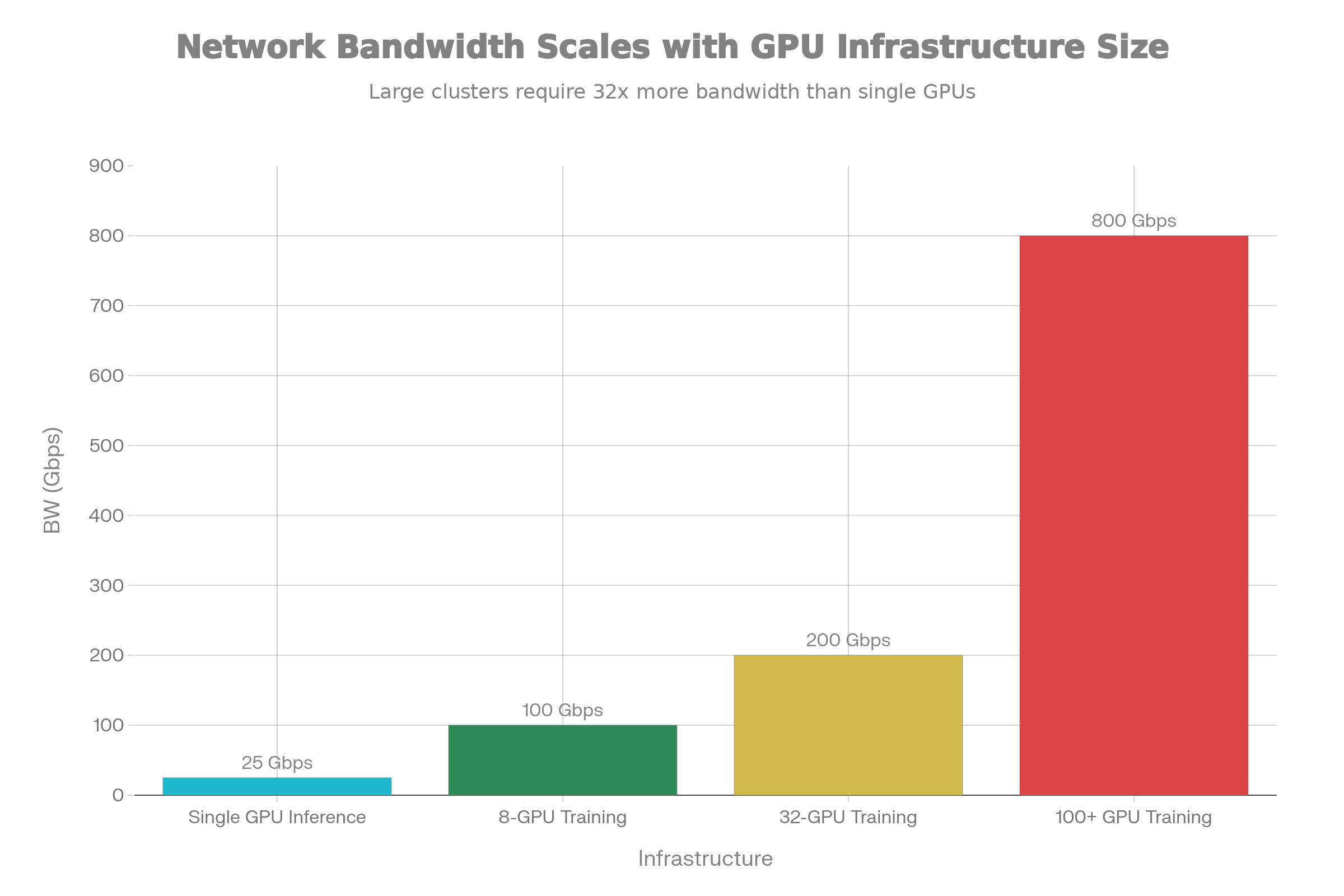
Network fabric tuning prevents distributed training slowdowns caused by insufficient interconnect bandwidth. Modern training across 8+ GPUs generates substantial inter-GPU communication traffic during gradient synchronization and model weight updates. Insufficient bandwidth causes synchronization latency to dominate, nullifying parallelization benefits. Networks supporting 100+ GPU training operations require 800 Gbps dedicated bandwidth per node with low-latency switching and lossless traffic delivery.
Storage throughput optimization ensures data pipelines feed GPU cores continuously. High-throughput storage systems achieving 300+ Gbps input/output pipelines prevent data starvation. GPUDirect Storage technology eliminates CPU intermediaries from the data path, enabling direct GPU-to-storage communication that increases data ingest throughput by 30-50% compared to traditional CPU-mediated transfers.
Practical data pipeline optimization applies parallel data loading using multiple CPU cores while GPU training proceeds, asynchronous prefetching of future batches while current batches process, and intelligent buffer management that maintains sufficient data availability without excessive memory overhead. Well-optimized data pipelines employ 8-32 threads with 1-16MB slice sizes during parallel reads, configurations that balance parallelism overhead against thread pool saturation.
Operational Excellence: Right-Sizing and Resource Management
Capacity reviews at regular intervals identify chronically underutilized resources. A GPU maintaining consistent 20% utilization despite optimization efforts should be repurposed to different workload types or released from infrastructure.
Hardware right-sizing matches workload profiles to optimal GPU tiers. Memory-intensive training runs benefit from high-capacity GPUs like H200 or B200 but may needlessly waste compute throughput. Inference services can often consolidate onto older-generation hardware (A100) that provides adequate performance at substantially lower hourly costs.
Multi-tenant isolation through containerization, quota enforcement, and quality-of-service controls prevents noisy-neighbor scenarios where high-priority workloads suffer interference from other tenants competing for shared resources.
Modern GPU Architecture Requirements for 2025 and Beyond
AI teams do not struggle because GPUs are slow. They struggle because the infrastructure around the GPUs gets in their way. Modern AI workloads need hardware that runs at full speed, stays predictable under load, and gives engineers complete control. Spheron AI was built around these needs, not the needs of traditional cloud vendors.
Most clouds still hide your GPU behind layers of virtualization. That kills performance. Spheron AI gives you full VM access. You log in, install what you want, tune what you need, and run your work as if the server is sitting next to you. No containers forced on you. No “managed environment” that slows things down. You get real control and real performance.
Bare metal matters. When the GPU is yours alone, the work runs faster. Spheron AI removes hypervisors and removes noisy neighbors so your models use 100% of the hardware. This boosts training speed by 15% to 20%. It also improves multi-node throughput by more than 30%. In simple words: you get more work done in less time and pay less for each result.
Most teams overpay for GPUs because they rely on one provider. Spheron flips that. It aggregates GPU supply from many providers into one network. This gives you better uptime and lower cost because Spheron spreads workloads across idle capacity around the world. There is no lock-in and no single point of failure. If one region goes down, your job does not.
Modern AI also needs more than one type of GPU. Some workloads need H100 or H200 clusters with SXM5, NVLink, NVSwitch, and InfiniBand. Some need a simple PCIe 4090 for fast iteration. Spheron supports both in the same dashboard. You can train a large model on an SXM cluster and test your changes on a PCIe GPU without switching platforms.
This range matters because the cost gap is huge. A100 on Google Cloud is about $3.30/hr. On Spheron it is about $0.73/hr. RTX 4090 on other clouds sits around $1/hour. On Spheron it is roughly half that. Users who migrate their workloads to Spheron report saving more than 60%. These savings compound fast and free up budget for research instead of compute bills..
Scaling is simple. Spheron gives you instant access to more than 2,000 GPUs across its network. You can scale up for heavy training and scale down for inference without changing your setup. There are no egress fees, no bandwidth penalties, and no hidden storage taxes. A built-in CDN makes model loading fast everywhere.
Ease of use matters more than ever. Teams want to focus on training and shipping models, not managing servers. Spheron removes that burden. You push a container or a model and launch a GPU instance in minutes. Real-time metrics, auto-scaling groups, and health checks are built in. Terraform support and SDKs make it easy to plug into your existing pipelines.
Security grows with the workload. Spheron offers a secure data-center-tier option when compliance is required. Many AI companies already use Spheron as their GPU backend because the platform is stable, predictable, and designed for ML workloads. You get the speed and flexibility of a startup-friendly system with the backbone of an enterprise provider. Compared to RunPod, Lambda Labs, CoreWeave, and Hyperbolic, Spheron stands out in three ways. You get full VM access. You get true bare metal performance. And you get a global aggregated network that avoids lock-in. Spheron also supports both PCIe and SXM5 clusters with InfiniBand, covering everything from quick experiments to large-scale model training.
This is what modern GPU architecture demands in 2025. Real control. Real performance. Global supply. Transparent pricing. Spheron AI was built around these needs. It removes old cloud limits and gives your team the freedom to train bigger models, deploy faster, and keep costs under control.
The result is simple. Your GPUs work harder. Your bills drop. And your team moves faster than your competitors.Frequently Addressed Questions