


Artificial Intelligence has reached a point where models are growing bigger, better, and more powerful. But the challenge is: how do you run massive models like GPT-4 or LLaMA 3 with 100 billion parameters on regular devices, without spending thousands on expensive GPUs?
That’s where Microsoft’s new open-source framework, bitnet.cpp, comes in. It breaks the barrier by allowing large language models (LLMs) to run efficiently on CPUs, using a clever technique called 1-bit quantization. You no longer need a data center or a high-end GPU to experience state-of-the-art AI performance.
Let’s explore how bitnet.cpp works, what it offers, and how you can use it to run powerful AI on your personal device.
What is bitnet.cpp?
bitnet.cpp is an open-source framework developed by Microsoft that makes it possible to run large language models—up to 100 billion parameters—on standard CPU hardware. Whether you have an Apple M2 chip or a regular Intel CPU, bitnet.cpp helps you deploy massive models locally without the usual high costs.
It does this by using 1-bit quantization, a method that compresses model data and allows it to run faster and more efficiently. This way, large models become much lighter and easier to handle, even on consumer devices.
Why This Matters
Traditionally, running large AI models like GPT-3 or GPT-4 needed powerful GPUs or TPUs. These are expensive and not accessible to everyone. Researchers, developers, and startups without large budgets often found it hard to experiment with or deploy large LLMs.
With bitnet.cpp, things are changing. Now, you can:
-
Run big models on a laptop or desktop CPU
-
Save money on cloud computing or GPU rentals
-
Keep data private with local execution
-
Develop and test AI applications without hardware constraints
This opens the door for more innovation, education, and experimentation in the AI field.
Key Features of bitnet.cpp
1. Run Large Models Without GPUs
bitnet.cpp eliminates the need for dedicated GPUs. You can run powerful LLMs on regular CPUs, which are more widely available. This lowers the entry barrier for AI development and makes the tech more inclusive.
Imagine being able to test and run GPT-scale models on a MacBook or Intel-based workstation. That’s now possible thanks to this framework.
2. 1-Bit Quantization
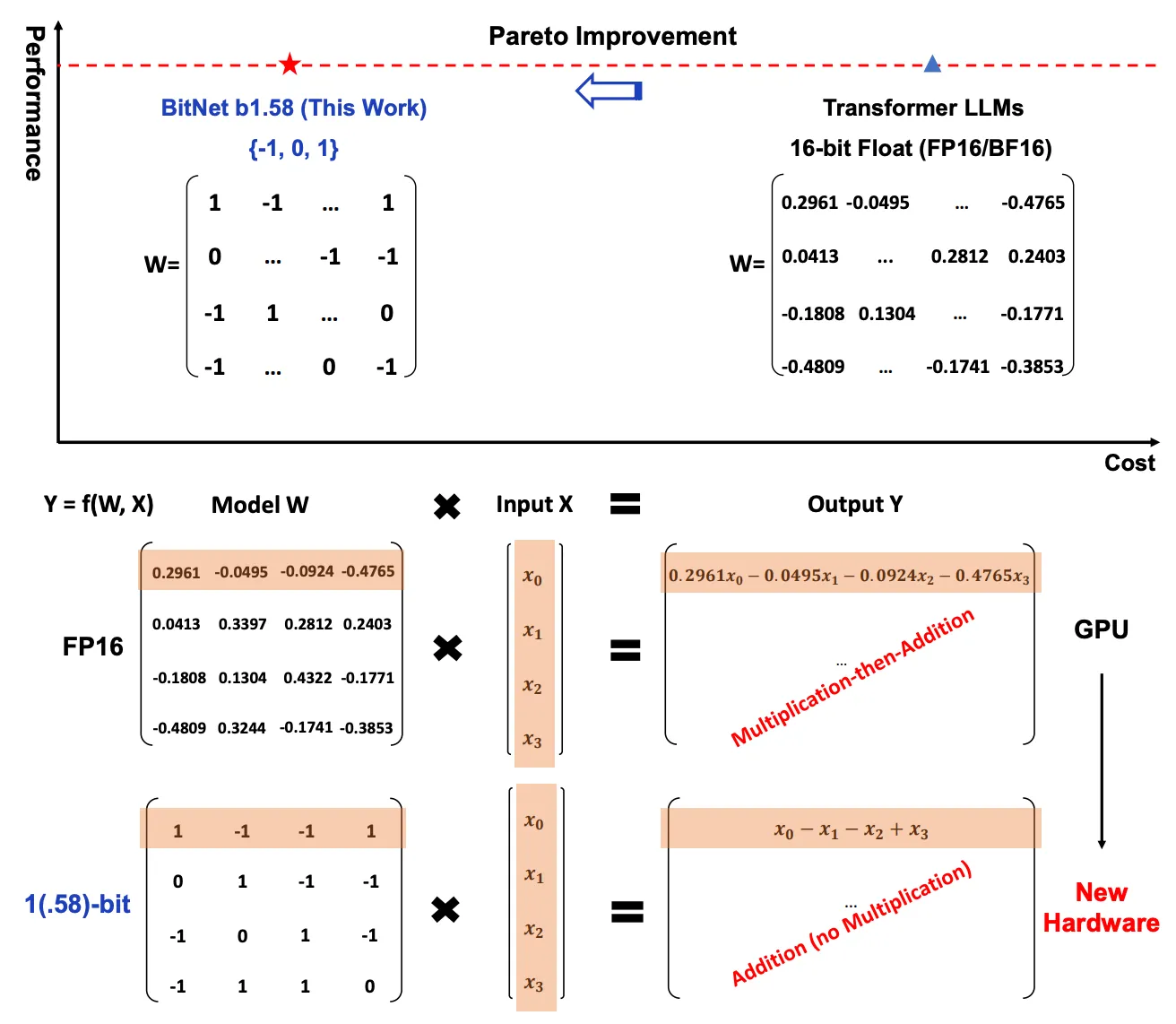
This is the secret sauce behind bitnet.cpp. Normally, AI models use 32-bit floating-point numbers to represent their weights. Bitnet.cpp compresses these weights down to just 1 bit, drastically reducing memory usage and speeding up computation.
Here’s what that means:
-
Less RAM is needed to run the model
-
Lower bandwidth requirements
-
Much faster inference (model responses)
-
Minimal drop in model accuracy
Despite the extreme compression, the inference quality remains almost the same. You still get accurate and useful outputs.
3. Multi-Platform Support
Whether you use an ARM-based chip (like Apple’s M2) or an x86 CPU (like Intel or AMD), bitnet.cpp runs smoothly. It’s optimized for different architectures, so you don’t need to worry about hardware compatibility.
This makes it ideal for both Mac and Windows users, as well as developers working on embedded or edge devices.
4. High Speed and Low Energy Use
Tests show that bitnet.cpp is significantly faster and more energy-efficient than older frameworks like llama.cpp. In some cases, it delivers:
For example:
-
A 13B model that runs at 1.78 tokens/second on llama.cpp can hit 10.99 tokens/second on bitnet.cpp.
-
On Apple M2 Ultra, energy usage drops by up to 70%.
-
On Intel i7-13700H, power savings go up to 82.2%.
That’s a game-changer, especially for battery-powered devices or large-scale deployments.
5. Big Memory Savings
Large models like GPT or BERT usually require hundreds of GBs of memory in their full-precision form. But with 1-bit quantization, bitnet.cpp shrinks them dramatically.
This allows these models to run on machines with much less RAM—making them usable on laptops, desktops, and even some edge devices.
6. Pareto Optimality
bitnet.cpp follows the Pareto principle: small changes bring big benefits. You get gains in speed, efficiency, and cost without a noticeable loss in performance. This balance is ideal for real-world applications, where perfect accuracy isn’t always worth the resource cost.
You can now deploy large models for real-time applications like:
-
Virtual assistants
-
AI writing tools
-
Local chatbots
-
Voice-to-text systems
-
Code generation
All without needing massive infrastructure.
Performance Overview
Here’s how bitnet.cpp compares to llama.cpp:
| Model Size | Tokens/sec (llama.cpp) | Tokens/sec (bitnet.cpp) | Speedup |
| 13B | 1.78 | 10.99 | 6.17x |
| 70B | 0.71 | 1.76 | 2.48x |
And the energy efficiency:
These numbers show just how optimized bitnet.cpp really is.
How bitnet.cpp Works
The power of bitnet.cpp comes from its technical foundation, especially the three main components:
1. 1-Bit Quantization
This compresses the model weights into 1-bit representations. Normally, weights are stored in 32-bit floating-point numbers. Reducing them to 1 bit slashes memory usage and computation needs.
But the magic lies in doing this without harming the model’s ability to generate accurate responses. It’s fast, efficient, and surprisingly reliable.
2. Optimized Kernels
bitnet.cpp uses optimized kernels to make computation faster and smarter:
-
I2_S Kernel: Great for multi-core CPUs. It distributes tasks across threads efficiently.
-
TL1 Kernel: Improves memory access and lookup speed.
-
TL2 Kernel: Ideal for devices with limited memory or bandwidth.
These kernels are designed to make the best use of your CPU’s architecture and capabilities.
3. Wide Model Compatibility
bitnet.cpp works with different model sizes and types—from small LLaMa models to massive 100B parameter models. This flexibility makes it suitable for developers at all levels.
How to Use bitnet.cpp
Here’s how to get started with bitnet.cpp on your machine:
Step 1: Clone the Repository
git clone --recursive https://github.com/microsoft/BitNet.git
cd BitNet
Step 2: Set Up the Environment
Create and activate a Python environment:
conda create -n bitnet-cpp python=3.9
conda activate bitnet-cpp
pip install -r requirements.txt
Step 3: Download and Quantize the Model
You’ll need to pull a model from Hugging Face and quantize it using bitnet’s tools:
python setup_env.py --hf-repo HF1BitLLM/Llama3-8B-1.58-100B-tokens -q i2_s
Step 4: Run Inference
Now you’re ready to use the model:
python run_inference.py -m models/Llama3-8B-1.58-100B-tokens/ggml-model-i2_s.gguf -p "Enter your prompt here."
You’ll get fast responses from the model, all without using a GPU.
Real-World Applications
With bitnet.cpp, you can build powerful AI tools on budget hardware. Here are a few ideas:
-
AI Writers: Create tools like WordGPT or Notion AI for content generation.
-
Private Chatbots: Run a local chatbot without internet connection or server dependency.
-
Educational Tools: Let students explore AI development on their own devices.
-
Edge AI: Deploy models on IoT or embedded devices without needing external servers.
-
Cost-Cutting AI Apps: Build scalable AI services without burning money on GPU cloud time.
Future of Accessible AI
bitnet.cpp is more than just a framework. It represents a shift in how we think about AI deployment. Instead of relying on cloud giants or expensive infrastructure, developers can now bring AI closer to the edge—into homes, schools, and small businesses.
This is the democratization of AI in action.
By making large models light and fast, Microsoft’s bitnet.cpp gives everyone the power to innovate with cutting-edge AI. Whether you’re an AI hobbyist or a developer building the next viral app, bitnet.cpp gives you the tools to succeed.
What’s Next?
As the field of AI continues to grow, tools like bitnet.cpp will lead the way in making AI more efficient and accessible. Expect more improvements, broader model support, and community contributions.
If you want to explore even more, try BotGPT—a custom chatbot builder that lets you create smart bots tailored to your needs using similar technology. You can integrate it into your apps, websites, or business tools and unlock next-level automation.
Conclusion
bitnet.cpp by Microsoft is a groundbreaking open-source project that helps you run powerful language models on standard CPUs. Thanks to smart engineering like 1-bit quantization and optimized kernels, it brings big model performance to everyday machines.
Whether you’re a solo developer, student, startup, or enterprise, this tool can supercharge your AI journey—without breaking the bank.