
Close Menu
    What's Hot

    Japan PM Takaichi backs Web3 startups with funding and rule changes

    ApeCoin’s 15% rally meets Q3 accelerator hype – Can APE reach $0.30?

    What is a bonding curve? The math that launches every memecoin

    Facebook X (Twitter) Instagram
    yeek.io
    • Crypto Chart
    • Crypto Price Chart
    X (Twitter) Instagram TikTok
    Trending Topics:
    • Altcoin
    • Bitcoin
    • Blockchain
    • Crypto News
    • DeFi
    • Ethereum
    • Meme Coins
    • NFTs
    • Web 3
    yeek.io
    • Altcoin
    • Bitcoin
    • Blockchain
    • Crypto News
    • DeFi
    • Ethereum
    • Meme Coins
    • NFTs
    • Web 3
    Web 3

    Beginner’s Guide to the Ethereum Name Service (ENS) — Layer3

    Yeek.ioBy Yeek.ioDecember 13, 2024No Comments2 Mins Read
    Share Facebook Twitter Pinterest Copy Link Telegram LinkedIn Tumblr Email
    Share
    Facebook Twitter LinkedIn Pinterest Email

    Ever struggled to remember and share complex Ethereum wallet addresses? You can easily solve this crypto conundrum with the Ethereum Name Service (ENS).

    Think of ENS as your contact book for Ethereum. Instead of a lengthy, complicated address (0x7abc…), you can use an easy-to-remember name such as “vitalik.eth” – making transactions simpler and user-friendly!

    In addition to streamlining payments, ENS unlocks a decentralized identity and social layer for Web3. There are currently over 2.5 million registered ENS domain names – making it the most popular crypto domain name standard.

    Here is a step-by-step guide to registering an ENS domain:

    1. Navigate to https://app.ens.domains.

    2. Search for a name and proceed to Connect your crypto wallet of choice (i.e. Metamask, Wallet Connect, Rainbow, Coinbase Wallet, etc.).
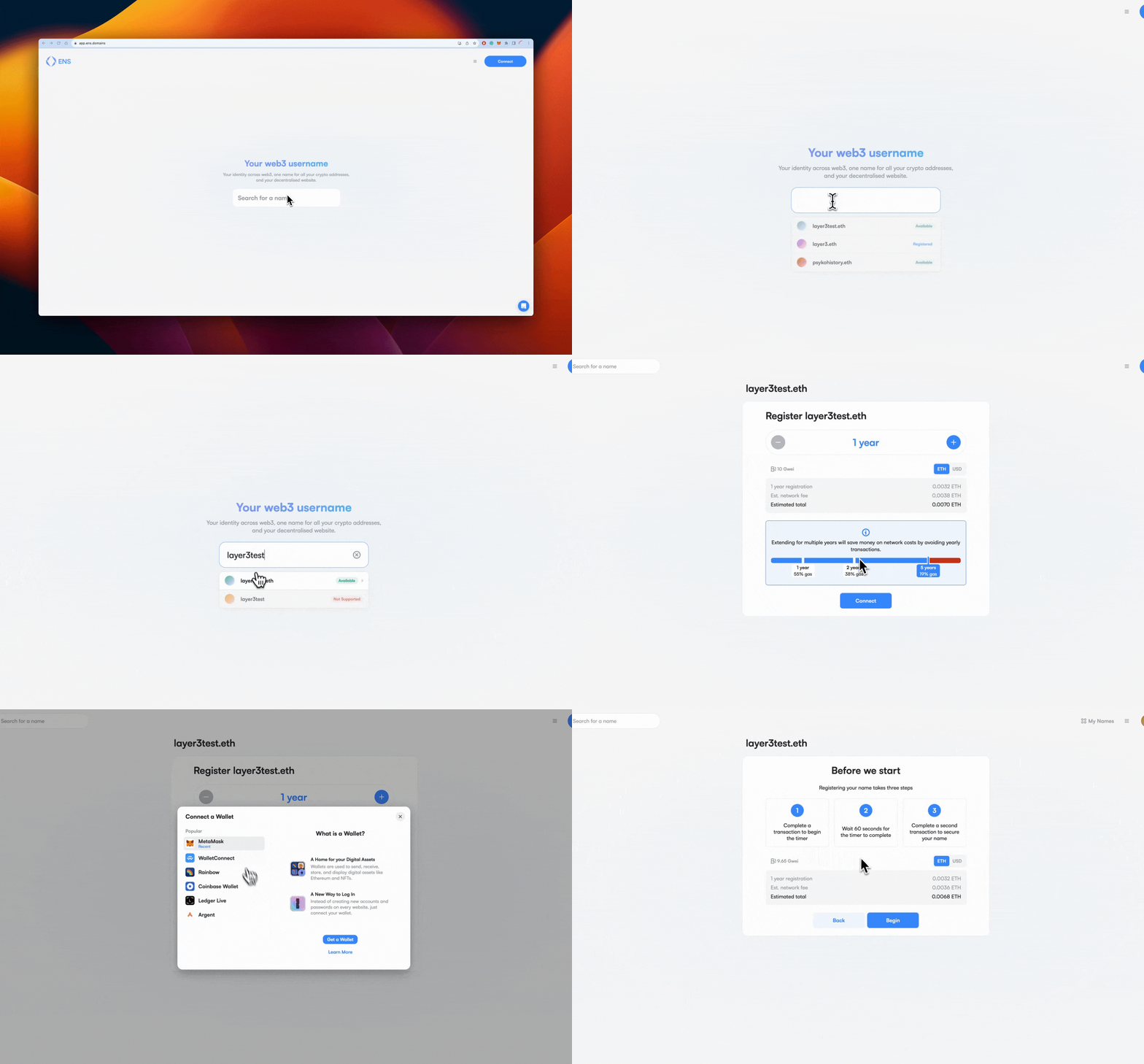
    Tip: Connecting your wallet to the ENS app and choosing an available domain requires a registration fee as well as a network or “gas” fee. Choosing a longer registration timeframe can help optimize gas costs.

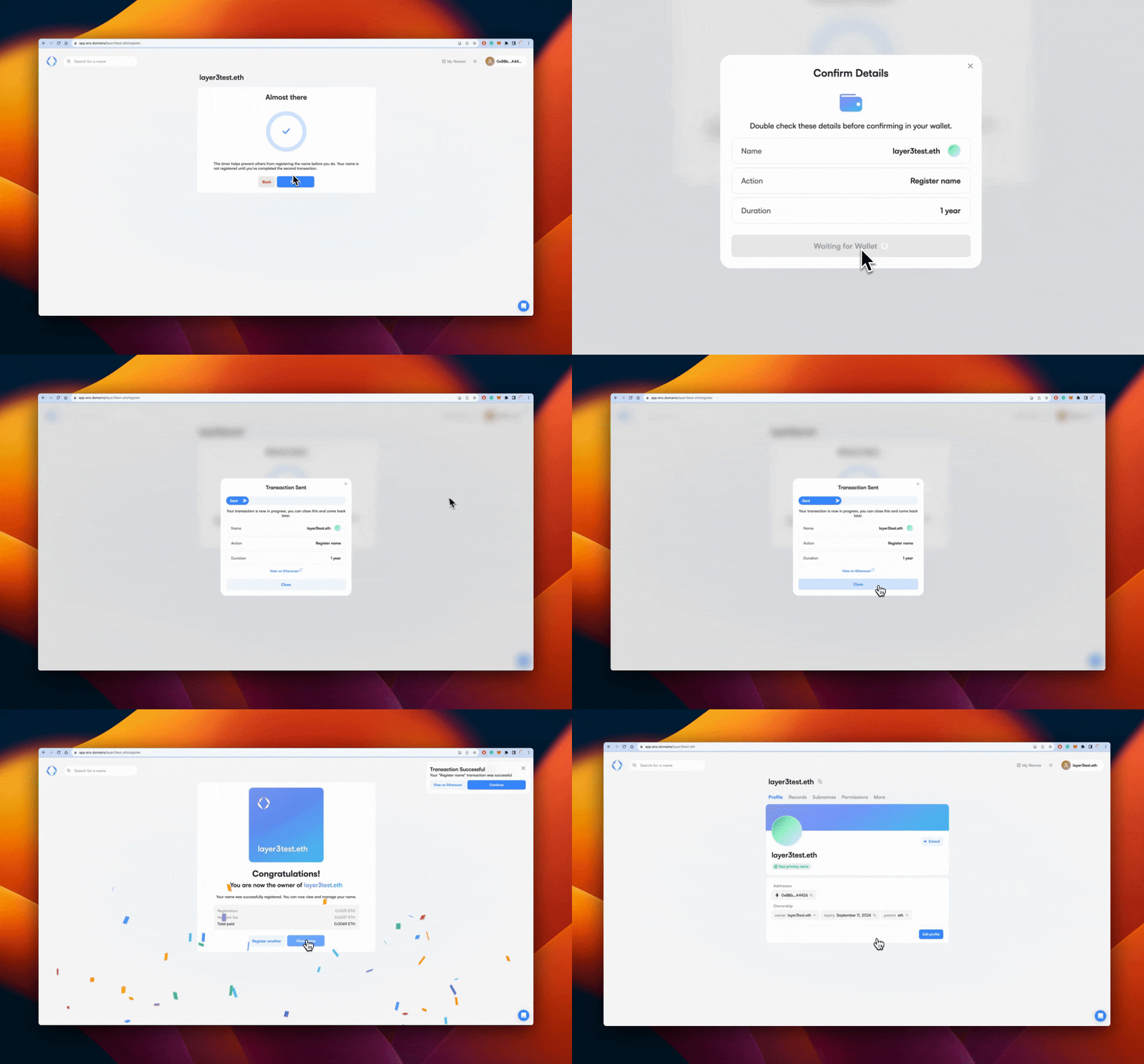
    After successfully connecting your wallet and choosing a registration timeframe, click Begin. Then, confirm the transaction details in your wallet and start the 60-second cooldown between the final confirmatory transaction.

    Next, click Finish and Open your wallet to confirm the transaction. After a few moments, your transaction will process, and then Congratulations! You are now a proud ENS domain owner – unlocking a seamless experience on the decentralized Internet.

    Follow on Google News Follow on Flipboard
    Share. Facebook Twitter Pinterest LinkedIn Tumblr Email Copy Link
    Previous ArticleHacker Exploits Dogecoin (DOGE) Flaw, Causing 69% of Nodes To Crash
    Next Article OKX lists VIRTUAL and SUNDOG on perpetual futures
    Avatar
    Yeek.io
    • Website

    Yeek.io is your trusted source for the latest cryptocurrency news, market updates, and blockchain insights. Stay informed with real-time updates, expert analysis, and comprehensive guides to navigate the dynamic world of crypto.

    Related Posts

    Japan PM Takaichi backs Web3 startups with funding and rule changes

    July 13, 2026

    How Sleepagotchi is trying to rebuild the Web3 health economy

    June 30, 2026

    Building Next-Gen Prediction Markets With Chainlink CRE

    June 12, 2026
    Leave A Reply Cancel Reply

    Advertisement
    Demo
    Latest Posts

    Japan PM Takaichi backs Web3 startups with funding and rule changes

    ApeCoin’s 15% rally meets Q3 accelerator hype – Can APE reach $0.30?

    What is a bonding curve? The math that launches every memecoin

    Shiba Inu drops 5% despite biggest token burn in 6 months – Here’s why!

    Popular Posts
    Advertisement
    Demo
    X (Twitter) TikTok Instagram

    Categories

    • Altcoin
    • Bitcoin
    • Blockchain
    • Crypto News

    Categories

    • Defi
    • Ethereum
    • Meme Coins
    • Nfts

    Quick Links

    • Home
    • About
    • Contact
    • Privacy Policy

    Important Links

    • Crypto Chart
    • Crypto Price Chart
    © 2026 Yeek. All Copyright Reserved

    Type above and press Enter to search. Press Esc to cancel.